I was looking at some of the new image manipulation features in Mathmatica.
Here is there example of Text Removal from an image:
http://www.wolfram.com/products/mathema ... Image.html
I'm wondering if anyone has any good ideas on how to reproduce these effects (or improve upon them) in IM
I was thinking of making a mask with the one color, then bluring the rest of the image and using that as the fill.
Text removal
-
fmw42

- Posts: 25562
- Joined: 2007-07-02T17:14:51-07:00
- Authentication code: 1152
- Location: Sunnyvale, California, USA
Re: Text removal
Here is how you do it, but you need my morphology script (http://www.fmwconcepts.com/imagemagick/index.html)dognose wrote:I was looking at some of the new image manipulation features in Mathmatica.
Here is there example of Text Removal from an image:
http://www.wolfram.com/products/mathema ... Image.html
I'm wondering if anyone has any good ideas on how to reproduce these effects (or improve upon them) in IM
I was thinking of making a mask with the one color, then bluring the rest of the image and using that as the fill.
original duck:
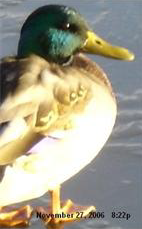
two iterations of morphologic grayscale close:
morphology -m grayscale -t close -i 2 duck.png duck_close2.png
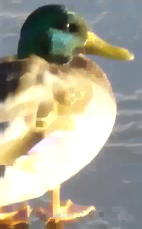
then subtract the latter from the former:
convert duck.png duck_close2.png -compose difference -composite duck_diff.png
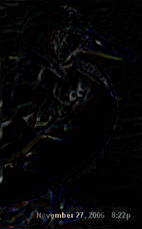
(this is the bottom hat image)
then threshold the result
convert duck_diff.png -threshold 25% duck_diff_t25.png
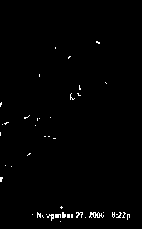
Then do a binary morpologic dilate
morphology -m binary -t dilate duck_diff_t25.png duck_diff_t25_dilate.png
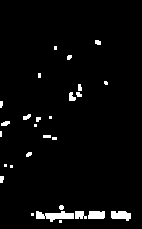
(you can cover over the top part of the image manually to get rid of the non-text white areas easy enough also, if you want by compositing a smaller black image from the top and which is just short of the text area. But I did not go that far here)
then composite the duck with the morphologic close using the last result as a mask
convert duck.png duck_close2.png duck_diff_t25_dilate.png -composite duck_comp_over.png
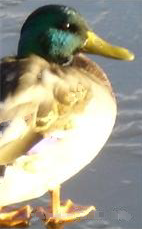
Voila, this keeps the original image where there was no text and the morphologic closed image where there was text (plus a little elsewhere, unfortunately)
-
anthony

- Posts: 8883
- Joined: 2004-05-31T19:27:03-07:00
- Authentication code: 8675308
- Location: Brisbane, Australia
Re: Text removal
To experiment I need a image to work with.
Now I am not doing to try to figure out the mask from that as it is very dependant on the image that you would be dealing with, so I'll just generate it directly...
Okay, lets do this... take image, use the mask to cut a hole in it, so as to remove the text, clone, blur and trash transparency to fill the hole with color, compose underneth the 'holely' image.
However the blur is still leaving too much black in the resulting image, even though the
Not bad!!! It worked quite well, a LOT better than I expected!
Adding this to 'photos' section of IM examples, until a better place can be figured out (may take a few days to appear).
http://www.imagemagick.org/Usage/photos/#removing
ASIDE: rather than blurring, an alternative way would be edge diffusion, or the use of the new -sparse-colors operator to limit the colors involved to just the edges of the mask 'hole'.
Please play with these, and let me know how you go.
Code: Select all
convert rose: -gravity center -annotate 0 Anthony rose_label.jpgCode: Select all
convert rose: -gamma 0 -gravity center -fill white -stroke white -strokewidth 2 -annotate 0 Anthony rose_mask.gifCode: Select all
convert rose_label.jpg \( rose_mask.gif -negate \) \
     -alpha off -compose CopyOpacity -composite \
    \( +clone -channel RGBA -blur 0x2 +channel -alpha off \) \
    +swap -compose Over -composite \
text_removed_by_hole_blurring.jpgNot bad!!! It worked quite well, a LOT better than I expected!
Adding this to 'photos' section of IM examples, until a better place can be figured out (may take a few days to appear).
http://www.imagemagick.org/Usage/photos/#removing
ASIDE: rather than blurring, an alternative way would be edge diffusion, or the use of the new -sparse-colors operator to limit the colors involved to just the edges of the mask 'hole'.
Please play with these, and let me know how you go.
Anthony Thyssen -- Webmaster for ImageMagick Example Pages
https://imagemagick.org/Usage/
https://imagemagick.org/Usage/
-
anthony
- Posts: 8883
- Joined: 2004-05-31T19:27:03-07:00
- Authentication code: 8675308
- Location: Brisbane, Australia
Re: Text removal
Using morphology to generate the replacement colors may be a better solution that a blur.
We really need to look at getting morphology operations, including a morphological skeleton, into IM at some point. This has now happened see Morphology in IM Examples.
Here is the same image using a simplified mask, and the blur method, for comparision


As you can see blur does not work quite as nicely as morphology operators.
Though the mophological replacement image can be helped by adding a small sub-pixel blur.
There are however other methods that restore the color areas even better, I have seen articals on them, but can never seem to find them in my bookmarks when I want them. Fred may be able to help in this.
We really need to look at getting morphology operations, including a morphological skeleton, into IM at some point. This has now happened see Morphology in IM Examples.
Here is the same image using a simplified mask, and the blur method, for comparision
Code: Select all
convert duck.png \( duck_mask.gif -negate \) \
          -alpha off -compose CopyOpacity -composite \
          \( +clone -channel RGBA -blur 0x1 +channel -alpha off \) \
          +swap -compose Over -composite  duck_removal_blur.png
As you can see blur does not work quite as nicely as morphology operators.
Though the mophological replacement image can be helped by adding a small sub-pixel blur.
There are however other methods that restore the color areas even better, I have seen articals on them, but can never seem to find them in my bookmarks when I want them. Fred may be able to help in this.
Anthony Thyssen -- Webmaster for ImageMagick Example Pages
https://imagemagick.org/Usage/
https://imagemagick.org/Usage/
-
fmw42
- Posts: 25562
- Joined: 2007-07-02T17:14:51-07:00
- Authentication code: 1152
- Location: Sunnyvale, California, USA
Re: Text removal
The only other method I know is GREYCstoration inpainting. See my tests and links at http://www.fmwconcepts.com/misc_tests/G ... index.htmlanthony wrote:Fred may be able to help in this.
Look at the owl inpainting example (second from bottom on my page).
Re: Text removal
Wow, great results guys, really better than I expected!
With all those "date stamps" from modern film cameras, this should certainly help a lot.
The blur wouldn't work well if the text was more than a few pixels wide.
The GREYCstoration program seems pretty neat as well, I'll have to try that out.
With all those "date stamps" from modern film cameras, this should certainly help a lot.
The blur wouldn't work well if the text was more than a few pixels wide.
The GREYCstoration program seems pretty neat as well, I'll have to try that out.
Re: Text removal
Before

Mask:

After: using greycstoration inpainting

The results are quite interesting, and it certainly removes the text (a bit noticeably here, but the text isn't readable) The biggest problem I see is that the mask needs to be much more dialated than the text to remove it all. Better work with generating the mask I think would be helpful.
Mask:
After: using greycstoration inpainting
The results are quite interesting, and it certainly removes the text (a bit noticeably here, but the text isn't readable) The biggest problem I see is that the mask needs to be much more dialated than the text to remove it all. Better work with generating the mask I think would be helpful.
-
anthony
- Posts: 8883
- Joined: 2004-05-31T19:27:03-07:00
- Authentication code: 8675308
- Location: Brisbane, Australia
Re: Text removal
The reason for the masked area around the text being so big is that the text has large color effects extending well beyond its nonomial boundary.
The cause for this is the use of low quality JPEG that has probably also been loaded and re-saved multiple times. The lossy nature of JPEG causes sharp color boundaries to spread out and diffuse over a larger region it is efforts to compress real-world images.
See IM Examples, Common File Formats JPEG, Lossy compression for more details.
The key here is to use a higher quality image if possible when removing text. though as text is on it, that may be asking a lot. I mean if you only have a copy of the image with text you probably do not have a good high quality source for the image.
The cause for this is the use of low quality JPEG that has probably also been loaded and re-saved multiple times. The lossy nature of JPEG causes sharp color boundaries to spread out and diffuse over a larger region it is efforts to compress real-world images.
See IM Examples, Common File Formats JPEG, Lossy compression for more details.
The key here is to use a higher quality image if possible when removing text. though as text is on it, that may be asking a lot. I mean if you only have a copy of the image with text you probably do not have a good high quality source for the image.
Anthony Thyssen -- Webmaster for ImageMagick Example Pages
https://imagemagick.org/Usage/
https://imagemagick.org/Usage/
-
anthony
- Posts: 8883
- Joined: 2004-05-31T19:27:03-07:00
- Authentication code: 8675308
- Location: Brisbane, Australia
Re: Text removal
I have made a new script called hole_fill_shepards available in the IM Examples Scripts Area
http://www.imagemagick.org/Usage/script ... l_shepards
This is based on the sparse-color method "shepards" which is basically a type of distance diffusion method (but without understanding of boundaries). See Sparse Color, as a Fill Operator
http://www.imagemagick.org/Usage/canvas/#sparse_fill
This make it easy to remove unwanted 'spam' on images. =>  =>
=> 
Note this has no understanding of textures, and as such only generates smooth hole filling gradients. However it does not lighten or darken the image as morphology replacement methods.
If the image contains a lot of JPEG and digital camera noise, a -t option may be used to make use of a thicker set of edge colors rather than just those around the immediate edge.
The current (as of writing) form treats all holes simultaneously and as such the 'shepards' color leakage between holes can make it more 'blury' than it should be. A probable enhancement would be to use a proper 'diffusion' that does understand boundary conditions. A very slow temporary alternative would be to hole fill each hole separately.
Comments welcome.
http://www.imagemagick.org/Usage/script ... l_shepards
This is based on the sparse-color method "shepards" which is basically a type of distance diffusion method (but without understanding of boundaries). See Sparse Color, as a Fill Operator
http://www.imagemagick.org/Usage/canvas/#sparse_fill
This make it easy to remove unwanted 'spam' on images.
- Load image into Gimp
- add transparency layer
- erase unwanted stuff leaving a hole
- save
- fill the hole!
=> => Note this has no understanding of textures, and as such only generates smooth hole filling gradients. However it does not lighten or darken the image as morphology replacement methods.
If the image contains a lot of JPEG and digital camera noise, a -t option may be used to make use of a thicker set of edge colors rather than just those around the immediate edge.
The current (as of writing) form treats all holes simultaneously and as such the 'shepards' color leakage between holes can make it more 'blury' than it should be. A probable enhancement would be to use a proper 'diffusion' that does understand boundary conditions. A very slow temporary alternative would be to hole fill each hole separately.
Comments welcome.
Anthony Thyssen -- Webmaster for ImageMagick Example Pages
https://imagemagick.org/Usage/
https://imagemagick.org/Usage/
-
fmw42
- Posts: 25562
- Joined: 2007-07-02T17:14:51-07:00
- Authentication code: 1152
- Location: Sunnyvale, California, USA
Re: Text removal
what does GIMP have to do with this hole filling process?
-
anthony
- Posts: 8883
- Joined: 2004-05-31T19:27:03-07:00
- Authentication code: 8675308
- Location: Brisbane, Australia
Re: Text removal
Just an interactive tool to select the part of the image for removal -- That is make the appropriate holes.fmw42 wrote:what does GIMP have to do with this hole filling process?
In the above example a mask image was available so in that case I just used to mask to make the hole, just as was done in previosu examples such as filling using a blur. But for general 'spam' removal from images, you would use an interactive tool.John Navarra wrote:Sometimes we need a hammer and sometimes a screwdriver.
I have used it quite a bit over the last weekend, and it works very well. In many cases I could not even tell where the 'spam' was removed from the final image, unless you do some type of 'error' analysis' to find where the image is smoother than expected.
In other cases more touchup work was done, often using the gimp 'clone-copy' tool to re-add a little texture to the missing patch. Usually a blury background pattern of some kind.
Anthony Thyssen -- Webmaster for ImageMagick Example Pages
https://imagemagick.org/Usage/
https://imagemagick.org/Usage/